
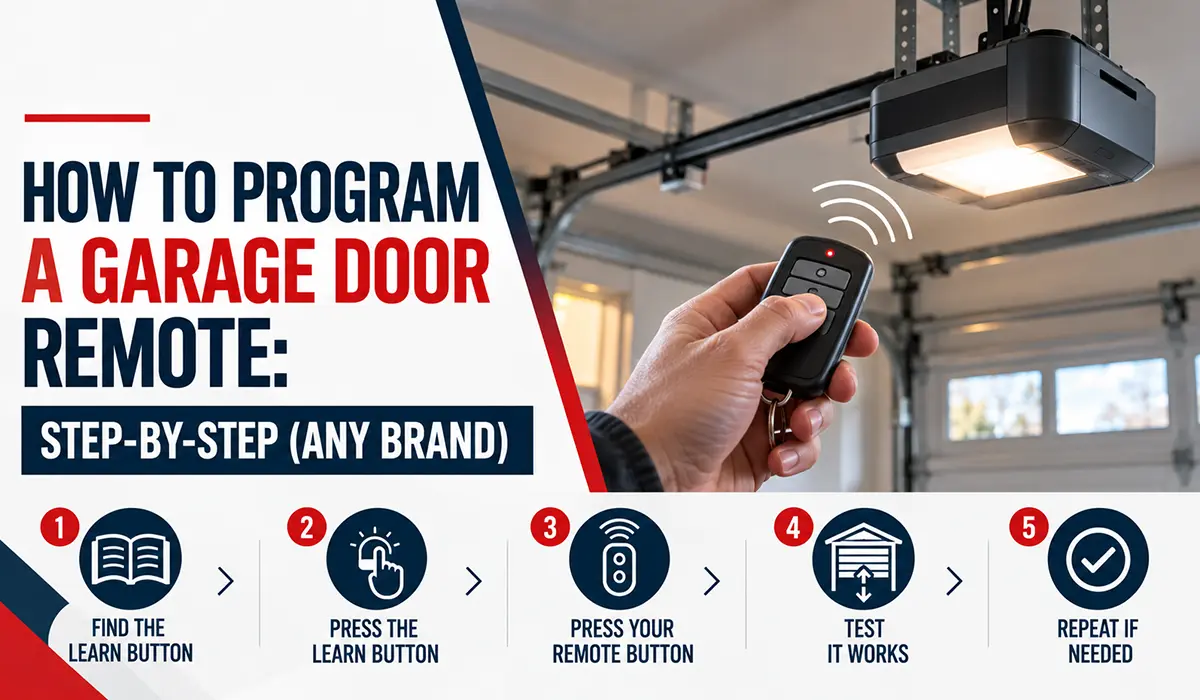
Most garage door remotes program the same basic way. You press the Learn button on the opener motor, then press the button on your remote within about 30 seconds, and the two are paired. That single method works for the large majority of openers made in the last couple of decades. Below is the universal step-by-step, followed by notes for the major brands, plus how to program a wireless keypad, how to set up your car’s built-in buttons, and how to erase old remotes when you need to.
Before you start
You will need a few things and a minute to get set up:
- A ladder or step stool to safely reach the opener motor on the ceiling.
- The remote you want to program, with a fresh battery in it. A weak battery is the most common reason programming fails.
- To know your opener brand, which is printed on the motor unit. This helps you find the Learn button and choose a compatible remote.
You do not need to unplug the opener. You do need the remote in hand and to be quick once you press the Learn button, since it only stays in learning mode for about half a minute.
The universal step-by-step
This works for most modern openers that have a Learn button.
- Find the Learn button on the opener motor. It is on the motor unit itself, usually on the back or side near the antenna wire, often under the light lens or a cover. There is a small LED light next to it.
- Press and release the Learn button. The LED next to it will light up. You now have about 30 seconds to finish, so move to the next step right away.
- Press the button on your remote. Press the button you want to use to open the door, once. Hold it for a second and release.
- Watch for the confirmation. The opener lights will blink, or you will hear a click from the motor. That means the remote is paired. If nothing happens after a couple of tries, repeat, and press the remote button a second time if your manual calls for it.
- Test the remote. Step back and press the remote to open and close the door. If it works, you are done.
That is the whole process for most openers. The rest of this guide covers the details that differ by brand and situation.
Where is the Learn button?
The Learn button lives on the motor unit, not on the wall control. Look on the back or the side of the opener, near where the hanging antenna wire comes out. On many units it is hidden under the light lens, so you may need to gently pop off or slide the cover to see it. There is always a small LED beside it that lights up when you press it.
The colour of the Learn button often tells you the opener’s technology and radio frequency, which matters when you buy a replacement remote. Matching a compatible remote to your opener is easier when you note that colour.
Brand-specific notes
LiftMaster, Chamberlain, and Craftsman. These are all made by the Chamberlain Group and use the same approach. Press and release the Learn button, then press your remote button within 30 seconds. The Learn button colour varies by model year and security version. A yellow Learn button indicates the current Security+ 2.0 system. When buying a replacement remote, match it to your opener’s button colour or frequency so it is compatible.
Genie. Genie openers use the Intellicode system and a button often labelled “Program Set” or “Learn Code.” Press and release that button so its LED comes on, then press your remote button. Some Genie models want you to press the remote button a second time to confirm, so if one press does not take, try pressing it again while the LED is still lit.
Older openers with DIP switches. If your opener is quite old and has no Learn button, it likely uses small DIP switches instead. In that case you set the tiny switches inside the remote to match the switch pattern in the opener or its receiver. Line them up exactly and the remote will work. These older systems are less secure than modern rolling-code remotes, which is one reason to consider upgrading.
How to program a wireless keypad
A keypad mounted outside the garage works much the same way, with one extra step for your PIN.
- Choose and enter your PIN on the keypad, following the keypad’s instructions to set it.
- Press the Learn button on the opener motor so the LED lights up.
- Within 30 seconds, enter your PIN on the keypad and press the enter or the main button.
- The opener will blink or click to confirm. Test the keypad by entering your PIN.
Keypads are handy for giving family, guests, or a contractor access without lending out a remote. You can find replacement remotes and keypads on our accessories page.
How to program your car’s built-in buttons (HomeLink)
Many vehicles have buttons built into the visor or mirror, often branded HomeLink, that can open your garage door. Programming these takes an extra step because of the rolling-code security in modern openers.
In general, you first train the car button by holding your working remote up to it until the car button learns the signal. Then, for a rolling-code opener, you press the Learn button on the opener motor and press the trained car button to sync the two. The exact steps vary by vehicle and opener, so check your car’s manual for the HomeLink instructions, since the button locations and timing differ between makes.
How to erase or reset remotes
There are good reasons to wipe the remotes from your opener. You bought a home and do not know who has remotes, you lost a remote, or one was stolen, or you are giving away a car with a programmed visor button.
To erase everything, press and hold the Learn button on the opener until the LED goes out, usually about 6 to 10 seconds. This clears every remote and keypad paired to the opener at once. After that, reprogram only the remotes and keypads you want to keep, using the steps above. This is a quick, effective way to lock out any remote you no longer control.
If your remote will not program
Run through these before assuming the remote is faulty:
- Replace the battery. A weak battery is the number one cause, and cold weather drains them faster, which is worth remembering in a Winnipeg winter.
- Beat the clock. The opener only stays in learning mode for about 30 seconds. If you were slow, press the Learn button again and try faster.
- Check compatibility. The remote has to match your opener’s brand and frequency, or be a universal remote that supports it. A remote for the wrong system will not pair.
- Confirm you pressed the right button. On some openers there is more than one Learn button or a similar-looking button. Make sure you pressed the correct one, next to the LED.
If the remote still will not program and the wall button also acts up, the problem may be the opener rather than the remote. Our post on what to check when a garage door opener is not working walks through the rest, and we carry replacement remotes on our accessories page.
Frequently asked questions
How do I program a garage door remote without a Learn button?
Older openers without a Learn button use DIP switches. You set the small switches inside the remote to match the switch pattern in the opener or receiver. If you cannot find switches or a Learn button, your opener may be too old for a standard remote, and a universal remote or a new opener may be needed.
Where is the Learn button on my garage door opener?
It is on the motor unit, usually on the back or side near the hanging antenna wire, often hidden under the light lens. There is a small LED next to it that lights up when you press it. It is not on the wall control.
Why won’t my garage door remote program?
The most common reasons are a weak battery, taking longer than 30 seconds after pressing the Learn button, an incompatible remote, or pressing the wrong button on the opener. Fix the battery and the timing first, then confirm the remote matches your opener’s brand and frequency.
How do I program a garage door remote to my car?
Most vehicles use HomeLink buttons on the visor or mirror. You train the car button by holding your remote up to it, then sync a rolling-code opener by pressing the Learn button on the opener and the car button. Check your car’s manual for the exact steps, since they vary by make.
How do I erase a lost or stolen remote from my opener?
Press and hold the Learn button on the opener until the LED goes out, about 6 to 10 seconds. This clears all paired remotes and keypads. Then reprogram only the ones you still have. This locks out any missing remote right away.
Need a remote, keypad, or a hand in Winnipeg?
Programming a remote is usually a two-minute job, but if your opener is older, hard to reach, or the remote just will not cooperate, we are happy to help. A1+ Door Systems is a family-run, BBB-accredited garage door company serving homes across Winnipeg, including St. James-Assiniboia, Transcona, St. Vital, Fort Garry, the Kildonans, St. Boniface, and beyond. We supply and program remotes and keypads for all major brands and can sort out any opener issue at the same time.
Call or text us at (204) 404-3667, or request service online.
A1+ Door Systems Inc. Suite 300, 330 St Mary Ave, Winnipeg, MB, R3C 3Z5